How to Get a Receipt from Amazon (2026): Step-by-Step Guide
Learn how to download, print, and save Amazon receipts and invoices for business expenses and tax records. Covers Amazon.ca, desktop, and mobile app methods.
 Eric Tech·Mar 24, 2026·Updated Sep 30, 2026·10 min read·
Amazon does not email you a traditional receipt after every purchase. Instead, Amazon generates invoices and order summaries that you can access through your account at any time. If you need a receipt from Amazon for a business expense, tax deduction, or reimbursement, you will need to download it yourself.
This guide walks you through every method to get Amazon receipts — on desktop, mobile, and through Amazon Business — so you can keep clean records for bookkeeping and tax time.
This guide is for informational purposes only and does not constitute tax advice. Consult a qualified tax professional for your specific situation.
How to Get a Receipt from Amazon on Desktop
The fastest way to download an Amazon receipt is through your order history on a computer.
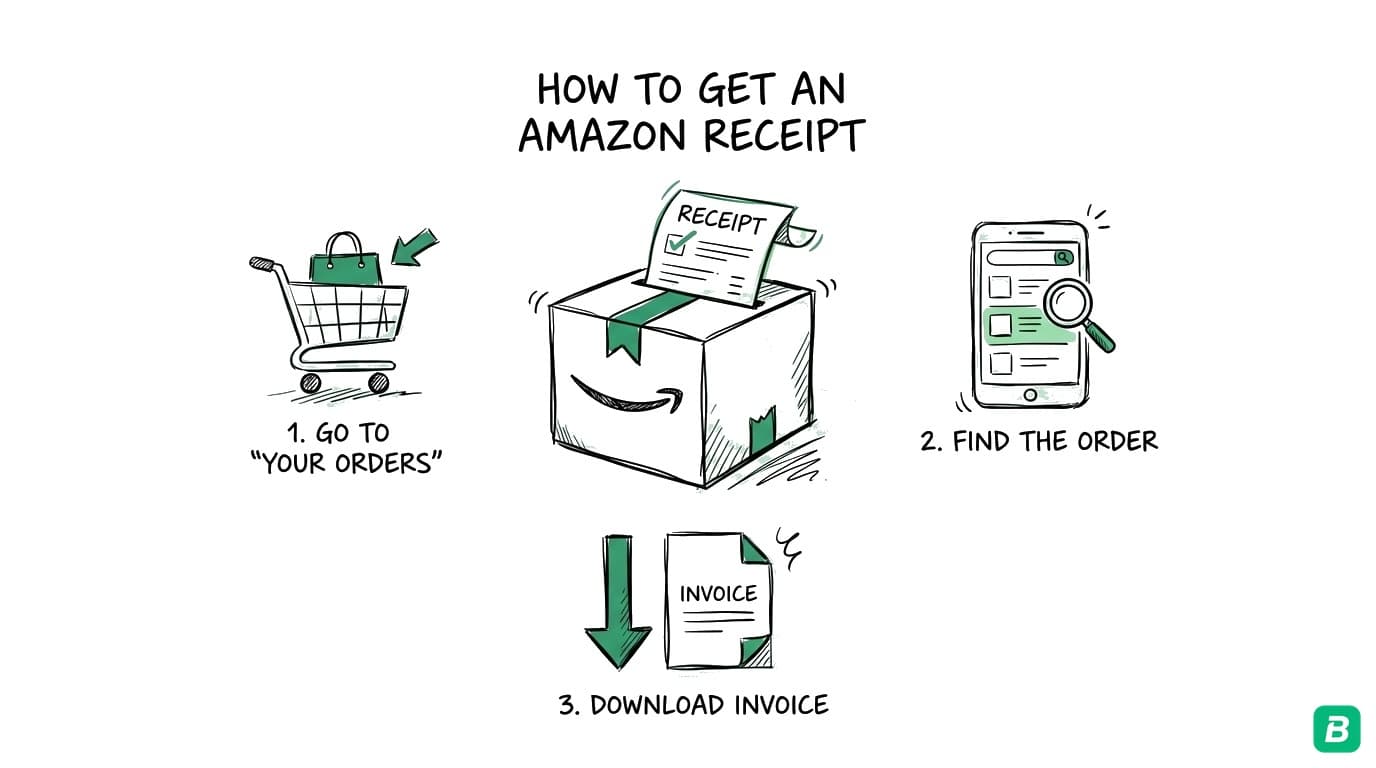
Step 1: Go to Your Orders
Log in to amazon.ca (or amazon.com for US purchases). Click Returns & Orders in the top-right corner of the page.
Step 2: Find the Order
Browse your recent orders or use the search bar to find a specific purchase. You can filter by year using the dropdown menu — Amazon keeps order history going back several years.
Step 3: Click "View Invoice"
Next to the order you need, click View invoice (on Amazon.ca) or Invoice (on Amazon.com). This opens the printable invoice in a new page.
If you see Invoice not available, it usually means the item has not shipped yet. Amazon generates invoices only after an order ships.
Step 4: Print or Save as PDF
Once the invoice is open:
- To print: Press
Ctrl + P(Windows) orCmd + P(Mac) and select your printer. - To save as PDF: In the print dialog, select Save as PDF as the destination instead of a printer. Choose a file name and save location.
Use a naming convention like amazon-2026-03-15-office-supplies.pdf so you can find receipts quickly at tax time. Include the date and a brief description of the purchase.
Step 5: Check for Multiple Invoices
If your order contained items from different sellers or items that shipped separately, Amazon may generate multiple invoices for a single order. Check that you have downloaded all invoices for the order — each shipment gets its own invoice.
How to Get a Receipt from Amazon on Mobile (App)
You can also access Amazon receipts from the Amazon Shopping app on iOS or Android.
Step 1: Open the Amazon App
Tap the profile icon (or the hamburger menu) and select Your Orders.
Step 2: Find the Order
Scroll through your orders or tap the search icon to find a specific purchase. Tap on the order to open the order details.
Step 3: Access the Invoice
Tap View invoice or Invoice within the order details. The invoice opens in the app's built-in browser.
Step 4: Save or Share
- Share as PDF: Tap the share icon and select Print. In the print preview, use the Share button or pinch to zoom out to generate a PDF you can save to Files (iOS) or your device storage (Android).
- Email to yourself: Use the share button to send the invoice to your email for easy filing.
Some sellers on Amazon Marketplace do not generate full invoices through the app. If you see a basic order summary instead of a detailed invoice with tax breakdowns, try accessing the same order on desktop for the complete version.
How to Download Amazon Invoices in Bulk
If you use Amazon frequently for business purchases, downloading invoices one by one gets tedious. Here are two ways to handle bulk downloads.
Amazon Business Accounts
If you have an Amazon Business account, you get access to features designed for expense tracking:
- Downloadable purchase reports: Go to Business Analytics > Purchase Reports to download CSV files of all purchases within a date range. These reports include item descriptions, prices, tax amounts, and order IDs.
- Tax-exempt purchasing: Amazon Business supports tax exemptions for qualifying organizations.
- Invoice dashboard: Business accounts provide a centralized invoice management view.
Amazon Business is free to sign up for. If you make regular business purchases on Amazon, switching to a Business account gives you much better record-keeping tools.
Browser Extensions
Several browser extensions can batch-download Amazon invoices. Search for "Amazon invoice download" in the Chrome Web Store. These tools typically loop through your order history and save each invoice as a PDF.
Be cautious with any extension that requires access to your Amazon account — only use well-reviewed extensions from reputable developers.
Tired of hunting for receipts one by one?
BookZero's AI scans any receipt in under 5 seconds — try it free for 7 days.


Tips for Organizing Amazon Receipts
Separate Personal and Business Purchases
The simplest approach is to use separate Amazon accounts — one personal, one business. If that is not practical, tag business purchases immediately after ordering so you do not have to sort through hundreds of personal orders at tax time.
Save Receipts as You Go
Do not wait until year-end to download 12 months of invoices. Download and file each business receipt within a week of purchase. A quick weekly habit takes 5 minutes; a year-end scramble takes hours.
Match Receipts to Bank Statements
For every Amazon charge on your business bank or credit card statement, you should have a matching invoice. This is called receipt-to-bank matching and it is essential for clean books and audit readiness.
Use a Receipt Management Tool
Instead of storing PDFs in random folders, use a tool that automatically extracts vendor names, amounts, dates, and tax details from your receipts. This saves significant time when you need to categorize expenses or prepare tax filings.
Keep Receipts for the Required Period
In Canada, the CRA requires you to keep business receipts for six years from the end of the tax year they relate to. In the US, the IRS generally requires three years, but up to seven years for certain situations. Digital copies are accepted by both agencies — you do not need to keep paper originals.
Amazon Receipts and Canadian Taxes
If you are a Canadian business owner buying supplies, equipment, or inventory on Amazon, your Amazon receipts are tax documents. Here is what you need to know.
GST/HST on Amazon Purchases
Amazon.ca collects GST or HST on most items sold and shipped within Canada. The tax amount appears on your invoice with a breakdown showing:
- GST (5%) in provinces with separate provincial tax (Alberta, BC, Manitoba, Saskatchewan)
- HST (13-15%) in harmonized provinces (Ontario, New Brunswick, Nova Scotia, etc.)
- QST (9.975%) separately for Quebec orders
Third-party Marketplace sellers on Amazon.ca also collect applicable GST/HST under the Marketplace facilitator rules that took effect in 2021.
Claiming Input Tax Credits (ITCs)
If you are registered for GST/HST, you can claim Input Tax Credits to recover the GST/HST paid on business purchases. To claim ITCs on Amazon purchases, your invoice must show:
- The seller's name and GST/HST registration number
- The date of the transaction
- The total amount paid
- The GST/HST amount charged
Amazon's invoices typically include all of this information. Check that the GST/HST registration number is present — it is usually listed near the bottom of the invoice. For more on ITCs, see our GST/HST guide for small businesses.
Items shipped from the US to Canada may not include GST/HST on the Amazon invoice. Instead, you may be charged duties and import taxes by the carrier at delivery. Keep the carrier's customs receipt alongside the Amazon invoice — you will need both for your records.
Amazon.ca vs Amazon.com for Business Expenses
If you purchase from Amazon.com (the US site) and have items shipped to Canada:
- GST/HST may not appear on the invoice
- You may pay import duties and brokerage fees at delivery
- The purchase is in USD, so you need to record the CAD equivalent for your books
- Currency conversion should use the Bank of Canada exchange rate on the transaction date
For cleaner bookkeeping, purchase from Amazon.ca when possible. The invoices will be in CAD with proper Canadian tax breakdowns.
CRA Requirements for Digital Receipts
The CRA accepts digital copies of receipts as valid documentation. Your Amazon PDF invoices are sufficient — you do not need to print them. Store them in a system where they are:
- Easily searchable by date, vendor, or amount
- Backed up (cloud storage or external drive)
- Retained for at least six years
If you are tracking Amazon purchases alongside other business expenses, a dedicated expense tracker can save significant time categorizing everything for your T2125 form.
Frequently Asked Questions
Does Amazon email receipts automatically?
Amazon sends an order confirmation email with a summary of your purchase, but this is not the same as a receipt or invoice. The confirmation email does not include tax breakdowns or seller registration numbers. For a proper receipt, you need to download the invoice from your order history as described above.
How far back can I access Amazon order history?
Amazon keeps your complete order history for as long as your account has existed. You can download invoices from orders placed years ago by filtering your order history by year. There is no expiration on accessing past invoices.
Can I get a receipt for a digital purchase (Kindle, Prime, etc.)?
Yes. Digital purchases like Kindle books, Prime Video rentals, and app subscriptions appear in your order history. Navigate to Your Orders, filter by Digital Orders, and you can access invoices for these purchases. Amazon Prime membership fees also generate invoices — search for "Prime" in your order history.
What if the invoice button is missing for an order?
The invoice is not available until the order has shipped. For pre-orders or items with delayed shipping, check back after the item ships. For cancelled orders, invoices are generally not generated. If a shipped order is missing its invoice, contact Amazon customer service through the Help section.
Are Amazon receipts valid for business expense claims?
Yes. Amazon invoices include the seller name, date, itemized list, amounts, and tax details — meeting the documentation requirements for both the CRA and IRS. For Canadian businesses claiming ITCs, verify that the GST/HST registration number is present on the invoice. If you purchase through Amazon Business, the invoices are specifically formatted for business record-keeping.
Stop wasting hours tracking down receipts.
BookZero organizes all your receipts for tax time — start free.

Eric Tech· Founder, BookZero.ai
Founder of BookZero. Building AI-powered bookkeeping tools for US and Canadian freelancers and small businesses.
View all postsStay ahead of tax season
Tax tips, deduction strategies, and feature announcements straight to your inbox. No spam, unsubscribe anytime.