How to Get Delta Airlines Receipts (2026): Flight & Baggage Receipts
Step-by-step guide to getting Delta Airlines receipts for flights, baggage fees, Sky Club, and in-flight purchases. Tax deduction tips included.
 Eric Tech·Mar 24, 2026·Updated Sep 30, 2026·13 min read·
Why You Need Your Delta Receipt
Every business flight needs a receipt. Whether you are filing an expense report, claiming a tax deduction, or documenting travel costs for a client project, the Delta receipt is your proof of purchase. Delta generates separate charges for flights, baggage, seat upgrades, Sky Club access, and in-flight purchases — so you may need to track down multiple receipts for a single trip.
This guide covers every method to retrieve your Delta Airlines receipts, including past flights going back over a year.
This guide is for informational purposes only and does not constitute tax advice. Consult a qualified tax professional for your specific situation.
How to Get Your Delta Flight Receipt
Method 1: Delta.com My Trips
The most reliable way to get your Delta receipt is through the Delta website.
- Go to delta.com and click Log In to sign into your SkyMiles account.
- Click on My Trips from the top navigation menu.
- Toggle to Past Trips or Completed Trips to view your flight history.
- Find the trip you need and click to expand it.
- Click View Receipt or E-Receipt to see the full fare breakdown.
- Print the receipt or save it as a PDF using your browser's print dialog (Ctrl+P or Cmd+P, then "Save as PDF").
Delta.com retains trip receipts for completed flights, making this the go-to method for recent travel.
If you fly Delta frequently for business, bookmark the My Trips page. Delta keeps receipts accessible for past trips, so you can pull them up anytime without digging through email.
Method 2: SkyMiles Account Receipt History
Your SkyMiles account stores a detailed history of flights, miles earned, and receipts.
- Log in to delta.com with your SkyMiles credentials.
- Navigate to My SkyMiles or My Profile.
- Select My Receipts or look under Account Activity.
- Browse your flight history and select the trip you need.
- Click to view and download the receipt.
SkyMiles account history typically goes back 12 to 24 months for receipt access. Mileage activity may be stored longer, but detailed receipts for older flights may require contacting Delta directly.
Method 3: Email Receipts
Delta sends several emails throughout your booking and travel:
- Booking confirmation: Sent immediately after purchase — this is your itinerary with fare details, but it is not the final receipt.
- E-ticket receipt: Sent after ticketing with your ticket number and fare breakdown.
- Post-flight receipt: Sent within a few days after your trip is completed, showing final charges including any adjustments.
Search your email for "Delta Air Lines receipt," "Your Delta e-Receipt," or "Trip receipt" to find these. Check spam and promotions folders. If you booked through a corporate travel tool or third-party site, the initial purchase receipt may come from that platform.
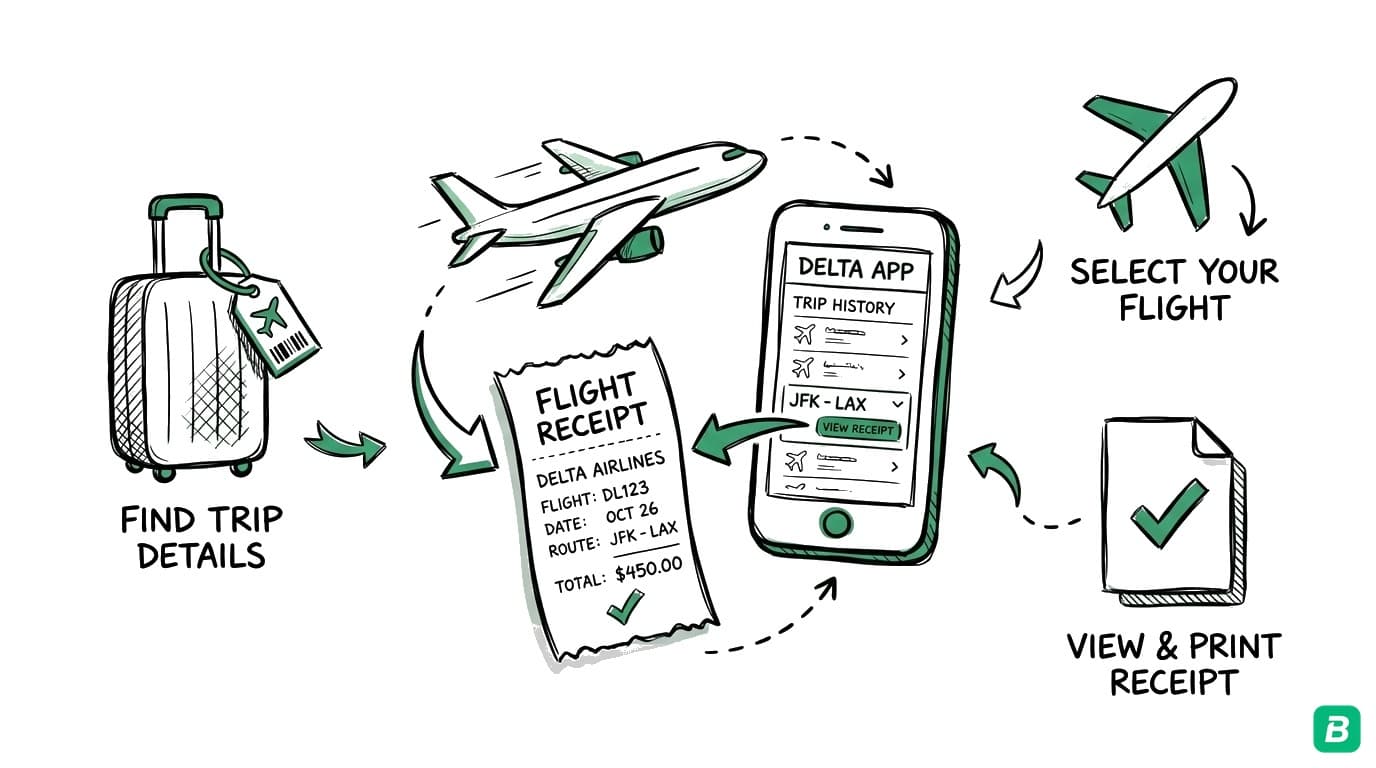
Method 4: Delta Mobile App
- Open the Fly Delta app on your phone (iOS or Android).
- Log in with your SkyMiles account.
- Tap My Trips and switch to past trips.
- Select the completed flight.
- View the receipt and use the share option to email it to yourself or save it.
The Delta app shows the same receipt information as the website and is convenient for pulling up receipts on the go.
Method 5: Contact Delta
If you cannot find your receipt online:
- Phone: Call Delta at 1-800-221-1212. Provide your confirmation number, flight date, and name. The agent can email a receipt.
- Delta Messenger: Use the chat feature on delta.com or in the Fly Delta app for receipt requests.
- Airport ticket counter: Visit any Delta ticket counter with your ID and flight information.
- SkyMiles members: Contact the SkyMiles service center for receipt history beyond what is available online.
How to Get Delta Baggage Fee Receipts
Like most airlines, Delta charges baggage fees separately from your ticket, and these generate their own transaction records.
Checked Baggage Receipts
- At the airport: When you check bags at the counter or kiosk, you receive a printed receipt. This is your primary baggage fee record — keep it with your travel documents.
- Online check-in: If you pre-pay for bags during check-in on delta.com or the app, the charge appears in your trip details and on your credit card statement.
- SkyMiles account: Pre-paid bag fees may appear in your account activity alongside your flight receipt.
- Credit card statement: The baggage fee shows as a separate Delta Air Lines charge on your card.
Your Delta flight receipt shows the ticket cost, taxes, and fare. Checked bag fees are a separate transaction. For complete expense reporting, you need both the flight receipt and the baggage receipt.
Free Baggage Benefits
Delta offers free checked bags to SkyMiles Medallion members, Delta SkyMiles credit card holders, and certain fare classes. If your bag was free, there is no receipt to retrieve — but note this in your expense records in case your company requires documentation of all travel costs.
Drowning in business travel receipts?
BookZero's AI scans and organizes them in seconds


How to Get Delta Sky Club Receipts
If you purchased a Delta Sky Club day pass or annual membership, or bought food and drinks inside a Sky Club, here is how to get those receipts:
- Day pass purchases: If you bought a day pass at the Sky Club entrance, the charge appears on your credit card. Delta may also email a receipt. Check your Delta account under recent activity.
- Annual membership: Your membership fee receipt is available through your SkyMiles account under membership details or billing history.
- In-lounge purchases: Premium food, drinks, and other purchases inside the Sky Club are charged to your card at the point of sale. You should receive a printed receipt — if not, the charge will appear on your credit card statement.
- Credit card lounge access: If your Delta SkyMiles credit card includes complimentary Sky Club access, there is no charge and no receipt needed.
How to Get Receipts for Delta In-Flight Purchases
Purchases made during your flight — Wi-Fi, snacks, drinks, headphones, or comfort items — are billed separately.
- In-flight Wi-Fi: Delta partners with Wi-Fi providers (T-Mobile/Viasat). Complimentary Wi-Fi for SkyMiles members does not generate a receipt. Paid Wi-Fi receipts come from the provider — check your email or the Wi-Fi portal.
- Food and beverages: Credit card purchases on board generate a receipt from Delta. Check your email for a separate in-flight purchase receipt, or find the charge on your credit card statement.
- Comfort+ and upgrade purchases: Seat upgrades purchased during check-in or at the gate appear in your Delta trip details and on your credit card statement.
What Information Appears on a Delta Receipt
A Delta flight receipt contains all the fields you need for expense tracking:
| Field | Description |
|---|---|
| Passenger name | Name as on the ticket |
| Confirmation number | Six-character booking code (e.g., G4XK2P) |
| Ticket number | 13-digit e-ticket number (starts with 006) |
| Flight segments | Flight number, date, departure city, arrival city for each leg |
| Fare class | Booking class and fare basis |
| Base fare | Ticket price before taxes |
| Taxes and fees | US excise tax (7.5%), segment fees, September 11 Security Fee, Passenger Facility Charges, international taxes |
| Total charged | Final amount billed |
| Form of payment | Last four digits of the card used |
| SkyMiles number | If linked to a loyalty account |
| Miles earned | SkyMiles earned for the trip |
For multi-segment trips (connections), the receipt shows each flight leg separately with the combined total at the bottom.
How to Find Past Delta Receipts (12+ Months)
For receipts older than what is available in your SkyMiles account:
- 12 to 24 months: Most receipts are accessible through delta.com under My Trips or Account Activity.
- Older than 24 months: Call Delta at 1-800-221-1212 and provide your name, approximate travel dates, and ticket number if available. Delta can look up past transactions in their system.
- Credit card records: Your credit card company retains transaction history for several years. Request a statement or transaction detail showing the Delta charge — this serves as backup documentation.
- Corporate travel: If you booked through a corporate travel management company (Concur, Navan, Amex GBT), those platforms retain booking and receipt data independently.
The easiest time to save a receipt is right after your trip. Forward the email receipt to a dedicated folder or scan it into your bookkeeping system within a week. Hunting down a receipt six months later is always harder.
How to Claim Delta Flights as a Business Expense
US Tax Deductions
Business airfare on Delta is deductible for self-employed individuals on Schedule C and for businesses as a travel expense. You can deduct:
- The flight ticket (base fare + taxes and fees)
- Checked baggage fees
- Seat upgrades when necessary for business (e.g., premium economy for overnight flights where you need to work the next morning)
- In-flight Wi-Fi used for business
- Sky Club access if used for business meetings or work between flights
- Change and cancellation fees for business trip modifications
The IRS requires the travel to be "ordinary and necessary" for your business. Keep receipts alongside documentation of the business purpose — a client meeting invite, conference agenda, or project notes.
If you use the Delta Sky Club to work between flights or hold informal client meetings, the day pass or membership fee can qualify as a business expense. Document the business use — a quick note like "Worked on client deliverable during 3-hour layover, ATL Sky Club" is sufficient.
Canadian Tax Deductions
Business flights on Delta are claimed on your T2125 form under travel expenses (Line 9200). Deductible items:
- Flight ticket cost (fare + taxes)
- Baggage fees
- Airport parking and ground transportation to/from the airport
- In-flight Wi-Fi for business use
- Travel insurance for the business trip
The CRA requires the travel to be directly related to earning business income. Document the business purpose and keep all receipts for six years.
For a complete overview of deductible business expenses, see our guide to Canadian small business tax deductions.
Delta Flights to and from Canada: Tax Considerations
Delta operates extensive service between the US and Canada, with hubs connecting to Toronto, Montreal, Vancouver, Calgary, and other Canadian cities. Here is what you need to know about taxes on these flights.
GST/HST on Delta Flights
- Transborder flights (Canada to US): Flights departing Canada for the US are zero-rated for GST/HST purposes. The base fare is not subject to GST/HST. You will still see the Air Travellers Security Charge (ATSC) and airport improvement fees.
- Transborder flights (US to Canada): Flights originating in the US and arriving in Canada do not attract Canadian GST/HST on the fare.
- Domestic Canadian flights: If Delta operates a domestic Canadian route (rare, as Delta primarily operates transborder service), GST/HST would apply to the fare. In practice, most Delta flights involving Canada cross the border.
Since most Delta flights to/from Canada are transborder and zero-rated, there is typically no GST/HST to recover through ITCs on the airfare. However, ancillary expenses in Canada — such as airport parking, ground transportation, or meals — may include GST/HST that is recoverable.
CRA Requirements for Flight Receipts
The CRA expects you to maintain the following for business flight deductions:
- Flight receipt showing fare, taxes, and total amount
- Boarding passes or e-ticket confirmations (digital copies are acceptable)
- Business purpose documentation — client name, meeting purpose, project reference
- Supporting travel receipts — hotel, meals, and ground transportation that corroborate the business nature of the trip
Keep these records for six years after the tax year in which you claimed the deduction. A well-organized system saves hours during tax season and protects you if the CRA requests documentation. For tips on organizing your records, see our 13 bookkeeping tips for self-employed Canadians.
Business airfare goes on Line 9200 (Travel expenses) of your T2125. Meals purchased during the trip are claimed separately on Line 9060 at 50% deductibility. Airport parking goes under Line 9281 (Motor vehicle expenses — other) or Line 9200 depending on the nature. See our T2125 guide for details.
Frequently Asked Questions
How soon after my flight can I get a Delta receipt?
Delta typically makes trip receipts available within 24 to 72 hours after your flight is completed. The receipt appears in your SkyMiles account under My Trips and is usually emailed to you as well. For immediate documentation, use your booking confirmation email and e-ticket receipt until the final trip receipt is generated.
Can I get a Delta receipt without a SkyMiles account?
Yes. You can look up your trip on delta.com using your confirmation number and last name under "My Trips" without logging in. You can also call Delta at 1-800-221-1212 and request a receipt by providing your booking details. However, a free SkyMiles account is worth creating — it stores all your trip history and makes future receipt retrieval effortless.
How do I get a receipt for a Delta flight booked through a travel agency?
If you booked through a third-party site or corporate travel tool, the purchase receipt may come from that platform. However, the flight receipt (showing the actual fare breakdown and taxes) is still available through delta.com if you look up the trip using your confirmation number. You can also link the booking to your SkyMiles account for automatic storage.
What if I need a receipt for a Delta flight I took over a year ago?
Check your SkyMiles account first — receipts may be available for up to 24 months. For older flights, call Delta customer service at 1-800-221-1212 with your name, approximate travel dates, and ticket number if you have it. Your credit card company can also provide transaction records for past Delta charges, which serve as supplementary documentation.
Why is my Delta receipt total different from my credit card charge?
Several things can cause a mismatch. Baggage fees, seat upgrades, in-flight purchases, and Sky Club charges are each billed as separate transactions — they will not appear on your flight receipt. Fare adjustments from schedule changes or voluntary rebookings can also alter the final amount. Compare your flight receipt with your full credit card statement to account for all Delta-related charges.
Stop wasting hours tracking down travel receipts.
BookZero organizes all your business receipts for tax time

Eric Tech· Founder, BookZero.ai
Founder of BookZero. Building AI-powered bookkeeping tools for US and Canadian freelancers and small businesses.
View all postsStay ahead of tax season
Tax tips, deduction strategies, and feature announcements straight to your inbox. No spam, unsubscribe anytime.